Put your recorded focus in the context of your calendar.
Your calendar shows the commitments around your week. FlowQuota shows the Focus sessions you deliberately recorded. Calendar Intelligence keeps those records separate, then helps you examine the structure around your focused work.
Connect Google Calendar only if you choose. Calendar events never become focused work, are not added to productive-time totals and do not affect your Focus Score.
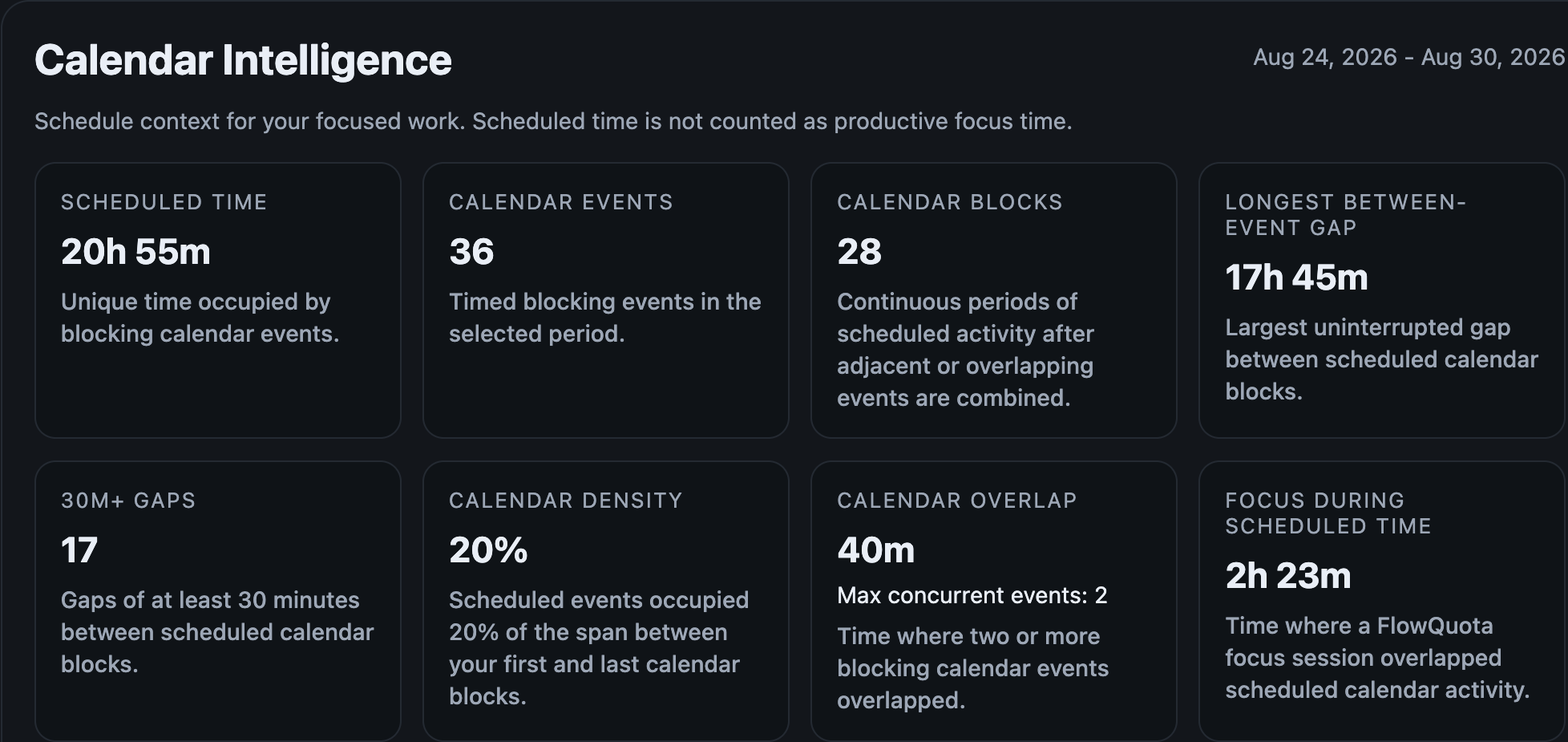
Your calendar shows scheduled context. FlowQuota records the Focus sessions you choose to run.
Scheduled context
A selected calendar can show timed blocking events, scheduled time, calendar blocks, overlap and gaps around your week. It does not prove that work happened, that an unscheduled gap was genuinely available or that an event was productive.
Recorded Focus
A FlowQuota Focus session is evidence you deliberately create when you run and record a session. Recorded-Focus totals and Focus Score use defined product evidence, not calendar occupancy. In Reporting, calendar information appears as a separate contextual layer.
Looking at the two records together can help you ask better questions about the week without turning scheduled time into a verdict on your performance.
See how FlowQuota builds evidence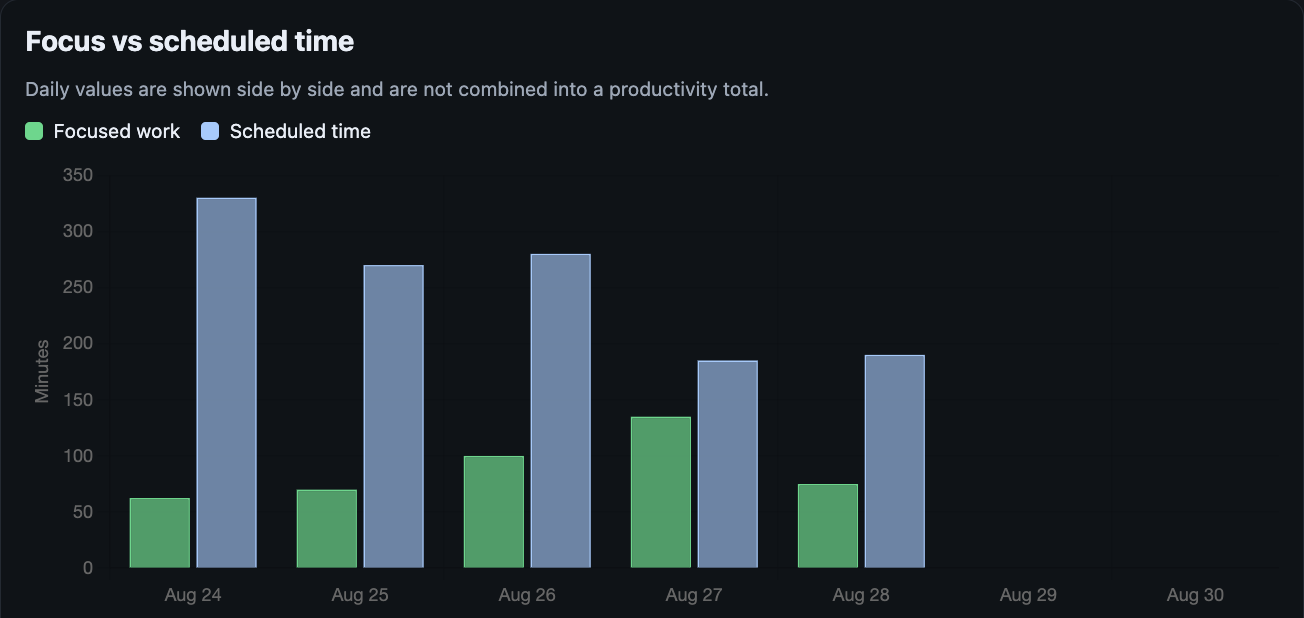
Understand the structure around the focus you recorded.
Working Hours
Set the hours you normally intend to work. FlowQuota uses them as context for calendar availability and focus patterns. They do not prove when you worked or what you produced, and changing them does not modify Google Calendar.
Question to examine: How did scheduled time sit within the hours you normally intend to work?
Scheduled time
See the timed blocking events and scheduled time in the period you are reviewing. Scheduled time remains calendar context, not productive-time credit.
Question to examine: Where did scheduled time sit alongside the Focus sessions you recorded?
Calendar structure and gaps
Examine calendar blocks, between-event gaps, density and overlap. An open gap is unscheduled calendar space, not proof of availability or capacity.
Question to examine: Did the structure leave a usable block worth protecting next time?
Protected Focus
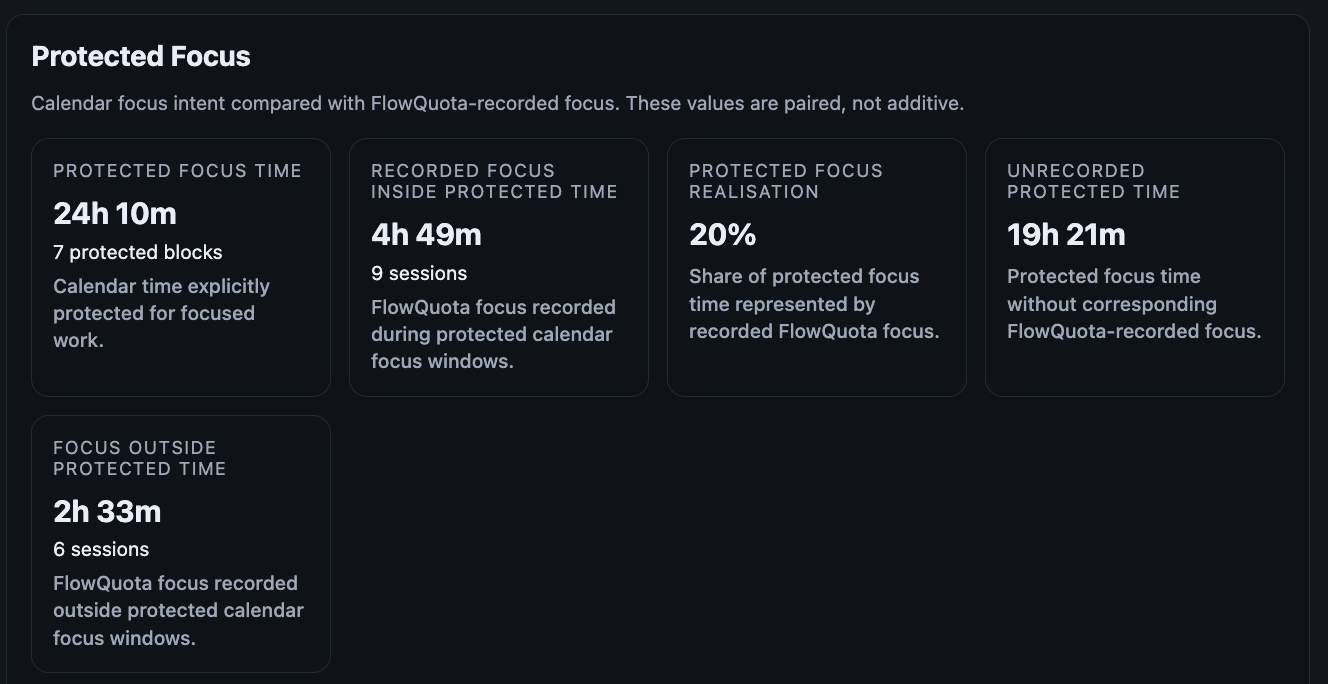
Eligible Google Calendar Focus Time can represent an intention to protect a block. FlowQuota keeps that intention distinct from a Focus session you actually record.
Question to examine: Did a Protected Focus block coincide with a deliberately recorded FlowQuota Focus session? If no session was recorded, the result remains unknown rather than being labelled unproductive.
See calendar context and recorded Focus without confusing the two.
Calendar Intelligence can show scheduled time, calendar events, calendar blocks, between-event gaps, density and overlap. Separate comparisons place scheduled time beside recorded Focus and compare Protected Focus intent with the Focus sessions recorded inside it. The values remain paired, not additive.
Choose the calendar context FlowQuota can use.
Connect a Google account, choose the calendars you want FlowQuota to use and separately grant read-only event access. Synchronisation is currently user-initiated through Sync now, so you decide when FlowQuota refreshes the selected calendar information.
FlowQuota retains limited connection, selected-calendar, event timing, status, type and synchronisation metadata needed to provide the feature. It does not retain event content such as titles, descriptions, attendees, locations, meeting links or conference details. The Privacy notice contains the complete inventory.
You can deselect a calendar or disconnect Google Calendar in Settings. FlowQuota does not create, edit, move or reschedule events and does not write changes back to Google Calendar.
Read the Privacy noticeCalendar information stays separate from Focus Score.
FlowQuota calculates Focus Score from defined product evidence. Calendar events do not enter that calculation, change the result or add productive-time credit.
Working Hours describe the hours you normally intend to work. Protected Focus describes an intention to protect time. Calendar events describe scheduled context. Calendar events never become recorded Focus; recorded Focus comes only from FlowQuota Focus sessions.
The relationship may reveal a pattern worth examining, but it cannot prove why the pattern occurred, the quality of your work or what your time was worth.
See how Focus Score is calculated- Recorded Focus sessions Reporting and Deterministic Focus Score
- Selected calendar metadata Separate Calendar Intelligence context and Optional bounded AI Briefing context
Give a weekly briefing more context, not more authority.
When eligible synced calendar context is available, FlowQuota may derive privacy-minimised summaries such as aggregate event load, Working Hours context, fragmentation patterns or Protected Focus information. Those bounded summaries may give an eligible weekly AI Briefing more context around the Focus patterns you recorded.
The AI interpretation may be imperfect or incomplete. It does not calculate Focus Score or act on the briefing for you. You decide whether any observation or suggestion fits your work.
Explore AI BriefingsSee the demands around your focus without turning your calendar into a score.
Start with the Focus sessions that matter. Add Google Calendar context if it helps you understand the structure around them.
Google Calendar integration is not included in Core. See Pricing for current availability, plans, access and trial options.