Articles
A RescueTime alternative without automatic app and website tracking
FlowQuota is a RescueTime alternative for professionals who want to understand their focus without automatically recording the apps and websites they use. You choose which work to record as Focus sessions, then use reports and Focus Score to understand your patterns. On the AI plan, personalised coaching in AI Briefings helps you turn those patterns into practical changes designed to improve your flow. If you want that support without a background activity log, FlowQuota offers a clear alternative.
Published
What would you like to know about your working day?
Imagine finishing a long day with the feeling that you have been busy almost continuously. You can remember the messages, the meetings and the work you intended to finish. It is harder to explain how much attention that important piece of work received.
One useful response is to examine the digital activity across your day. Another is to build a selected record of the work you intentionally sit down to do.
The choice also depends on what you are comfortable recording. You may want to understand your working patterns without keeping a history of your computer activity. That is where FlowQuota offers a different approach.
What RescueTime already offers
RescueTime's help documentation explains its background approach to recording computer activity. Rather than depending on you to start a session for each task, it builds a record of app and website use.
Its plan comparison describes a free Lite plan with basic tracking and reporting, paid Solo Focus features including Focus Sessions and distraction blocking, and Solo+ with Timesheets and project tracking. Those are meaningful capabilities if you want broad activity awareness, active help staying away from distractions or project-time records.
RescueTime also goes beyond a passive log. Its Assistant uses activity context to support focus decisions. Its MCP documentation describes connecting compatible AI assistants to tracked activity and project information. The distinction is the evidence behind the advice: FlowQuota builds its focus insight from the sessions you choose to record, rather than a background history of app and website use.
For someone who regularly forgets timers, automatic capture is a substantial advantage. If that is the problem you need solved, a tool that asks you to record sessions deliberately may add friction.
Want focus insight without a background activity log?
Automatic tracking can be useful, but it is a choice you should be comfortable making. If you do not want a productivity tool to build a record of the other apps and websites you use, FlowQuota is a better fit for that preference.
FlowQuota does not build that background activity log. You decide when to start a Focus session and which project or category it belongs to. You can examine the attention you give to important work without collecting a history of the applications and websites involved.
For a consultant, that might mean recording time deliberately spent on a client proposal without logging every research site or application used along the way. For a marketer, it might mean understanding when strategy work receives attention without recording the rest of the digital day.
The benefit is a focus record built around the work you want to understand. The commitment is remembering to record those sessions. If automatic coverage is your priority, RescueTime's approach may suit you better.
What changes when the record starts with your intention
FlowQuota starts with selected Focus sessions. You choose the work, begin the session and organise the record using projects or categories. Over time, those records provide material for review.
That is useful when your question is specific: how consistently am I making space for this project? When does the work I choose to record tend to happen? Which pattern should I examine more closely?
FlowQuota's Focus Score is calculated from recorded focus behaviour. It does not tell you whether a proposal was persuasive, a design was good or an hour created enough value. Those judgements still need the work itself.
On the AI plan, AI Briefings combine analysis with practical recommendations and Coaching Notes, helping you decide how to improve your flow when there is enough recorded evidence. Optional Calendar Intelligence helps you understand the commitments around that focus. View recorded sessions alongside scheduled time to examine whether meeting-heavy or fragmented days coincide with fewer opportunities for the work you wanted to do. That gives you a practical question to act on: where could you protect a more workable block next week? Calendar events provide context rather than counting as completed Focus sessions.
The tradeoff is coverage. If you do not record a period, FlowQuota does not know what happened in it. An empty space cannot fairly be called distraction, inactivity or wasted time.
AI coaching to help you improve your flow
Understanding a pattern is useful. Knowing what to try next is where the coaching earns its place.
FlowQuota's weekly AI Briefings bring together Patterns, Risk Signals, Recommendations and Coaching Notes. They help you move from “this is what my recorded week looked like” to “this is a change I can try in the week ahead”. The recommendations suggest practical adjustments; the Coaching Notes help you reflect on how those suggestions fit your work.
For example, a briefing might suggest changing when you make time for a type of work, based on the focus patterns in your record. You can assess that suggestion against your commitments, try a workable adjustment and use subsequent records and your own experience to review it. This is an illustrative coaching process, rather than a promise of a particular recommendation or result.
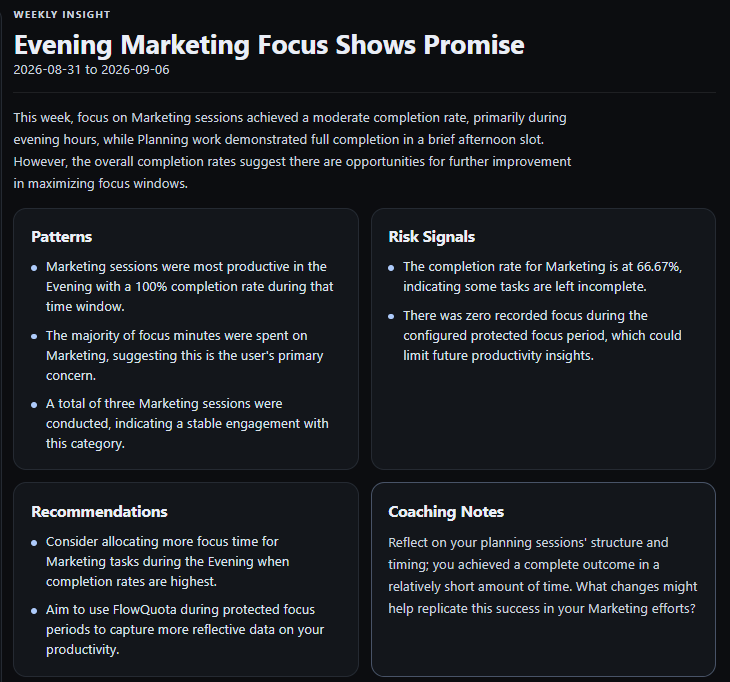
That is the value of FlowQuota's AI coaching: personalised support designed to help you improve your flow, grounded in the work you choose to record. You do not have to translate every chart into an action on your own. You retain the judgement about which advice to use.
Compare the choice behind the features
| What you need | RescueTime | FlowQuota |
|---|---|---|
| Focus insight without logging other apps and websites | Automatic app and website tracking is central to its activity record | Deliberate Focus sessions without a background app and website activity log |
| A record without starting every work session | Background app and website activity capture | Deliberately recorded Focus sessions |
| Help preventing digital distractions | Paid Focus Sessions include blocking tools | Session structure and review; not a replacement for app and website blocking |
| Understand your focus patterns | Activity reporting and focus-support tools | Recorded Focus reports and a defined Focus Score |
| Help deciding what to change | Reports, the Assistant and documented connections to compatible AI assistants | Weekly AI coaching through Patterns, Risk Signals, Recommendations and Coaching Notes, designed to help you improve your flow |
| A free ongoing entry plan | Lite provides basic capture and reports | Subscription plans with a free trial |
| Project reporting and timesheet preparation | Timesheets capabilities in relevant plans, with automatic project tracking | Filter History by Project and category, then export the filtered records as CSV or PDF for project reporting, client updates or timesheet preparation |
These are workflow descriptions, rather than a ranking of which product makes people more productive. Check each product's current plan details for the capabilities you need.
Project records you can use beyond FlowQuota
The value of a focus record does not end with your own weekly review. If you need to explain where time went on a project, FlowQuota lets you filter the History page by Project and category, then export the filtered records as CSV or PDF.
Use CSV when you want to work with the records in a spreadsheet or prepare a timesheet. Use PDF when you want a readable report to share with a client or colleague. You can bring the selected work into a project update without handing over a background history of your app and website use.
For a consultant, that means a record of sessions assigned to a client project that can support reporting and billing preparation. For a marketer, it means pulling together recorded work on a campaign or category for a planning conversation. The record reflects the sessions you captured, so it is worth checking that it covers the work you intend to report.
If your priority is automatically reconstructing project time from computer activity, RescueTime's Timesheets offering remains relevant. If you prefer to choose what to record and want those records to support both your focus development and your project reporting, FlowQuota offers that combination.
A concrete reason to try a different approach
Take this hypothetical example. A consultant wants to protect time for a difficult client proposal. Several applications are involved: documents, research in a browser and a spreadsheet. The question is whether the proposal is receiving deliberate attention regularly enough.
RescueTime can provide an activity perspective and automated project-time tracking through its Timesheets offering. FlowQuota gives the consultant a deliberately recorded project history that they can also filter and export. The choice is how they want to create that record and use it.
If the consultant does not want their app and website activity recorded, FlowQuota lets them build a different kind of evidence. They can record chosen proposal sessions and examine their distribution over time. With optional calendar context, they can also compare those sessions with the scheduled commitments around them. The question becomes where to make room for the proposal, without needing a background log of their computer activity.
They might then decide to try a protected session earlier in the day. They can use AI coaching to consider a practical adjustment and judge whether the proposal progresses. When they need a project update, they can filter History to the proposal’s Project and category and export the selected records as CSV or PDF.
FlowQuota connects three useful jobs: building a record of chosen work, using AI coaching to improve how that work happens, and taking filtered project records into a report or timesheet workflow.
Test the habit during a normal working week
Start by writing one question you want the record to answer. Keep it concrete: “When am I recording work on the proposal?” is easier to investigate than “Am I productive?”
For an initial week, record a few meaningful sessions within your usual routine. Keep brief notes where context matters. Avoid changing your schedule, task system and working method all at once, because it becomes harder to judge what helped.
Then review:
- Coverage: did you record enough of the selected work to understand it, or did you frequently forget?
- Meaning: do the reports describe something you care about, and can you explain their limits?
- Action: is there one sensible adjustment you want to test next?
- Reporting: can you filter the relevant Project and category in History and use the CSV or PDF export for the project report you need?
That first week tests the recording habit. It does not guarantee a reliable pattern, an AI Briefing or a productivity improvement. If you keep missing sessions and want broader digital coverage, automatic tracking may remain the better choice.
See how FlowQuota works to examine how sessions and review work before trying it.
Common questions about RescueTime alternatives
Does FlowQuota track apps and websites automatically?
No. FlowQuota records the Focus sessions you choose to start, rather than automatically logging other apps and websites you use. This makes it an alternative for people who want to understand their focus without a background record of their computer activity.
How does FlowQuota’s AI coaching help me improve my flow?
On the AI plan, weekly AI Briefings use your recorded focus evidence to highlight patterns, flag areas to examine and suggest practical adjustments. Coaching Notes help you reflect on how to apply the advice to your own working week. You choose what to try and review whether it helps; sufficient recorded evidence is needed to generate a briefing.
Will FlowQuota block distracting websites?
It is not an app and website blocker. If blocking is essential, retain a tool that provides it. RescueTime's paid Focus offering includes that capability.
Can I use RescueTime and FlowQuota together?
You can retain automatic activity reporting and separately record chosen Focus sessions. That would be a manual workflow; no native RescueTime-to-FlowQuota connection or history migration is established here. Compare whether the second record adds a useful decision or simply duplicates effort.
Can I export my project time from FlowQuota?
Yes. Filter the History page by Project and category, then export the filtered session records as CSV or PDF. CSV is useful for spreadsheet work and timesheet preparation; PDF gives you a report you can share. The export contains the selected recorded sessions.
Is FlowQuota a free RescueTime alternative?
FlowQuota has subscription plans and a free trial. RescueTime Lite provides an ongoing free option with limited capabilities. Compare current FlowQuota plans and RescueTime's published plans rather than treating a trial as a permanent free tier.
Choose the evidence you will use
If you want to understand and improve your focus without automatically recording the other apps and websites you use, FlowQuota gives you a clear alternative to RescueTime. Start with work that matters to you, record your Focus sessions and use the evidence to understand your patterns. With the AI plan, personalised coaching helps you choose practical changes designed to improve your flow. Optional calendar context brings the commitments around that work into the review.
Choose RescueTime if automatic activity capture, distraction blocking or automated project-time tracking is your priority. Choose FlowQuota if you want control over which work you record, AI coaching to help improve your flow, and filtered project records you can export and use beyond the app.
Sources and comparison method
Checked 1 November 2026: RescueTime's capture explanation, plan comparison, Assistant, MCP guide and pricing; FlowQuota's product, Focus Score, AI Briefings, calendar context, privacy policy and pricing. Capabilities are published vendor descriptions; fit recommendations are FlowQuota's editorial judgement. The example is hypothetical.
Published by FlowQuota. This comparison uses current public product documentation, checked on 1 November 2026. It explains the choices behind each workflow; it is not a hands-on product test.